
Video Competitions (& entries)
CLOSING /SUBMISSION DATES
All entries must be submitted and paid for at time of Closing
Provisional Test entries are paid AFTER the Competition
Videos must be submitted by a certain date and time, as specified (usually the Wednesday prior to the advertised Competitition Date)
JUDGES
1-2 Judges, as determined by the Executive, will review all entries in a Zoom meeting
PAYMENT
payment is by eTransfer (preferred), cash or cheque
payment is due upon entering except Provisional entries, which are billed afterwards
refunds will be processed up to and including the day of closing
Provisional Tests
Provisional tests will be billed afterwards, if used
videos of provisional tests will not be shown to Judges if the previous level has not been passed.
RIBBONS
All tests will receive the same Ribbons as the Live competitions
The FAQ below is valid for both Video Competitions and Test Videos submitted for Live Events
FAQ for Videos
Can I submit a video to a Live Competition?
You can submit a Test video to a Live competition but not a Freestyle or a Heeling entry. You will be expected to submit your video the Wednesday before the Live Competition
How much space do I need?
Freestyle/HTM Entries
minimum 1100 sq. ft, maximum 1800 sq ft
area to be defined by any combination of the following; walls, gates, fences or pylons
full ring parameters need to be seen at least once (entering the ring would be a good opportunity)
Proficiency and/or Tricks tests
approximately 10′ X 10′ (your Living-room with all the furniture pushed back or …)
it is suggested that each element start at the ‘X’ but if that means you don’t have enough space to complete it, start in a place where you do!
Are there any modifications for a smaller space?
Because of the small space that many people may be working in, the following adjustments can be made
Note: if you have sufficient space, you should do the element in the traditional fashion
How do I plan my space?
put an ‘X’ on the floor in the centre – that’s your spot for elements listed as ”stationary”
it is suggested that each element start at the ‘X’ but if that means you don’t have enough space to complete it, then start in a place where you do!
mark out your space so you know where you will be off-camera; don’t cut your head or your dog’s body off!
be sure that you are close enough that the Judges can see you and your dog clearly; don’t video yourself at the back of a field!
Can someone else do my videos for me?
Yes, of course but…
if possible, have them do it on your own device, not theirs
always check the video before you submit it to see if all the criteria have been met
it is your responsibility to make sure it has been filmed correctly and is uploaded correctly
Note: Do NOT email your videos from someone else to your computer and then upload. They will be too large and the email program will probably shrink them to make them fit, resulting in a poor quality.
What format should I use — Landscape or Portrait?
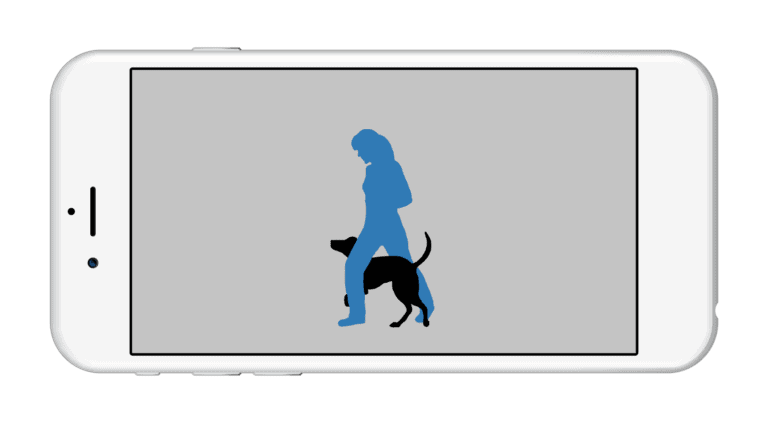
camera must be in landscape format and show the dog and Handler at all times
if either goes off-camera during a Freestyle or HTM routine, that will be assumed to be leaving the ring, and a disqualification
Panning is allowed but the following shows a suggestion of a minimum shot size; anything tighter risks the dog moving off-camera, and does not give the Judges the sense of the use of the space
How do I prepare my Video?
Videos cannot be edited, except to trim the beginning and end.
be sure not to trim so close to the end of your video that you cut off your finish of an element!
If you wish, you may trim your video to the beginning of music and the end of entry (or end of music, whichever comes first.)
5 seconds additional will be allowed for turning on device and walking into frame (if needed, you have an extra 5 seconds after the music has finished)
How to Trim Videos on a Phone
What video formats are accepted?
Set your camera to record in the highest resolution it can.
In phones and tablets, these settings can be found in Settings, and then Camera or Photos (depending on your device)
For Video cameras, it is usually under Menu, then Format, or Settings
SmugMug (our video provider) can accept just about any video format. In general, it can accept popular formats like.mov, .AVI, most Mpeg formats, h.264, .m4a, and .m4v.
WMV files may contain some form of Windows Media Video, which is not supported, and occasionally .MOV files do not play nice. MPEGs are best.
Individual videos are limited to 20 minutes in length and/or 3GB in size.
How do I upload a Video?
You can upload a video at any time. After you have completed an Entry form and Entries close for that competition, it will be moved into a Competition Gallery.
The Upload link is: https://paws2dance.smugmug.com/upload/HJfQx5/TempHOLD
When you go to the address it shows multiple options:
on a Desktop, you can Drag n’ Drop or choose a file
on Android: choose ‘Files’, then Gallery or Video (depending on version)
on iPhone: choose Photo Library or Camera Roll (depending on version)
Note: Do NOT email your videos from your phone to your computer and then upload. They will be too large and your email program on your phone will probably shrink them to make them fit resulting in a poor quality.
How do I know my Video has Uploaded?
If your Video has successfully uploaded, SmugMug will give you a cutesy screen:
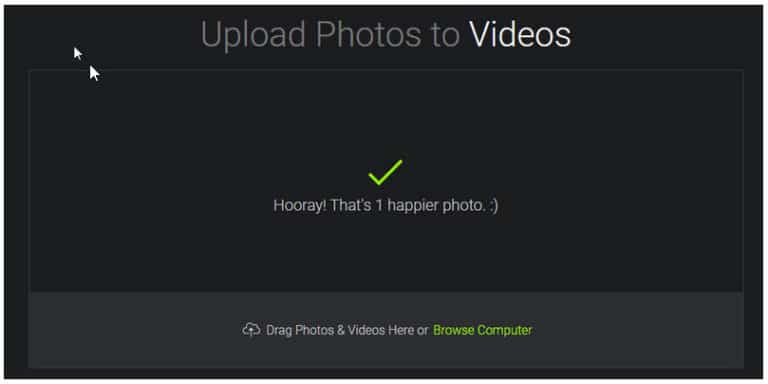
If there has been any problem, you will see a red notice on the upload page (even though it says ‘DONE’ and ‘COMPLETED’)
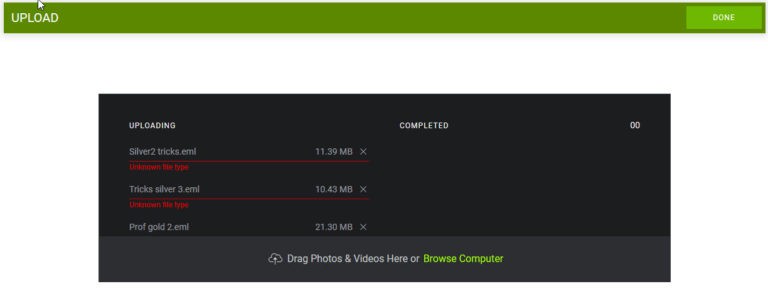
In this case, it was a format that it did not accept: “Unknown file type”.
How soon will my video appear?
It is usually quite fast, but could take up to 5 minutes. SmugMug has to convert it to the format it uses to show the video. You may see a black box with the word “Processing“. If you do, wait a few minutes and look again
To be safe, upload all videos at least 15 minutes before the deadline!
Can I try a Test Run before submitting anything?
you can do a trial run by uploading to this site.
It is for practicing only – nothing here will be viewed by the Judges.
It can be any video you have, not necessarily a dog video.
Upload to Test Site: https://paws2dance.smugmug.com/upload/Crr39W/MemberUploadTest
View Test Site: https://paws2dance.smugmug.com/Competitions/Member-Upload-Tests/n-fTxCDb/
I’m out of space on my device. Can I ‘park’ my video online until the next Competition?
Yes, you can upload to the following gallery. This is only a Holding Area. You can even use this to upload different versions of the same thing.
https://paws2dance.smugmug.com/upload/HJfQx5/TempHOLD
When you want it to be added to a competition, let me know and I can move it over. Make note of the date you uploaded so if you have multiple copies of the same thing, I can find the one you want.
I have a question not covered here.
Shoot me an email! I’ll answer your question and add it to this page!
p2dance@gmail.com